
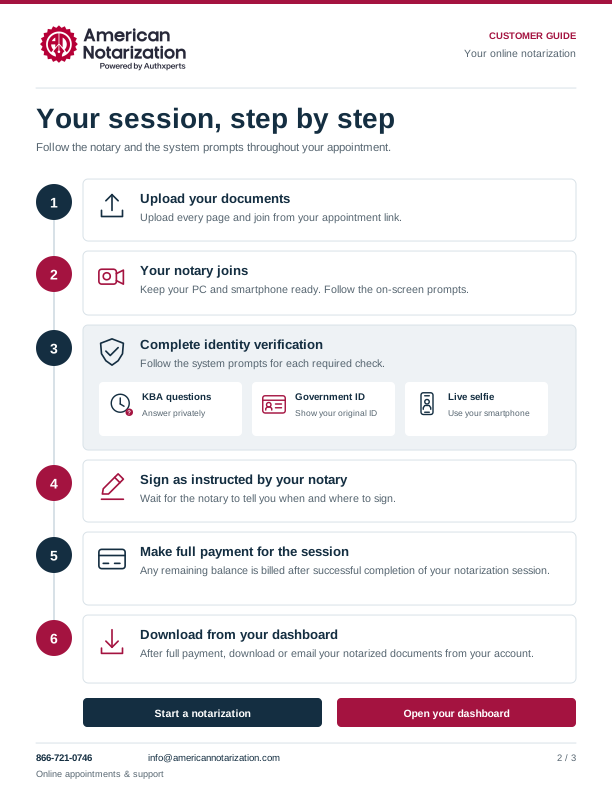
How remote online notarization works
Upload your documents and join your appointment. Follow the verification prompts as your notary joins, then sign, pay, and download.
Step 1: Upload documents
Upload your complete PDF, DOCX, or clear document photo.
Step 2: Join the notary
Use your appointment link and join on your own computer.
Step 3: Verify your identity
Complete KBA, government-issued ID, and a live selfie as prompted.
Step 4: Sign as instructed
Follow the notary’s directions for each signature.
Step 5: Pay the session balance
Pay any remaining balance after a successful session.
Step 6: Download from dashboard
After full payment, download your notarized documents.
One signer. One computer.
Your own camera, microphone, email, and invitation.
Keep your smartphone ready for ID and live-selfie prompts.Document preparation
Upload a complete, readable copy through the secure appointment portal. The notary reviews it before signing.
Before your appointment
- Confirm recipient acceptance and the notarial act.
- Share every signer’s location and witness needs.
- Request review for overseas or limited U.S. identity history.
Before you pay
- Have your credit card ready and review the expected total.
- Check any applicable verification charge.
- Pay the remaining balance after successful completion to access your document.
View the complete six-step workflow
Upload your documents
Upload the complete PDF, DOCX file, or clear document photos. Include every page and the recipient’s signing instructions.
Join your appointment
Open your appointment invitation on your own PC or laptop. Have your government-issued ID, charged smartphone, and credit card ready.
Complete identity verification
As the notary joins, follow the system prompts for required KBA, ID verification, and a live selfie. Answer KBA privately and use your smartphone when prompted.
Sign as instructed
After verification, follow the notary’s instructions to sign. The notary completes the required certificate and seal.
Complete session payment
Complete the full session payment after successful notarization. Review the amount due in the portal before paying.
Download from your dashboard
Once payment is complete, download your notarized document from your dashboard or email it to the recipient.
Download the appointment guide
Save the workflow and printable checklist.